Device Default List and Device Physical Connection
Device Default List
When unboxing, please refer to this list to verify each included item, the following is the WITHBOX default accessories list. When unboxing, please verify the following items are complete:
- Host ×1
- Power Adapter (Standard AC input global wide voltage 100~240V 50~60HZ) Output 12V/3A) ×1
- Gigabit Network Cable ×1
- Quick Start Guide ×1
- Warranty Card ×1
After confirming the above items are complete, you can proceed to the next step of physical device installation.
Physical Device Installation
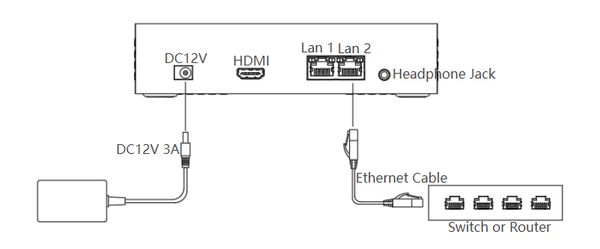
Step 1: Use the included Gigabit network cable to connect the switch/router and WITHBOX (Not required; if you cannot connect via the network port, you need to configure WIFI, please refer to section 2.3 for details).
Step 2: Connect the 12V power adapter. After 30-60 seconds, the white LED indicator will stay solid, indicating that the device has started normally.
Note: During installation, do not bend the cables. During operation, please handle with care.